A throwaway that shipped
Every core file in this thing is stamped with a note at the top calling it a throwaway spike, a quick proof that a weather globe was even possible. The plan was to learn from it and then build the real one. That never happened. The scrappy prototype rendered well enough, held up under traffic, and quietly became the live site at stl-radar.com without anyone deciding it should. I am telling you that up front because it explains a lot of what follows: the globe is held together by a stack of small fixes, each one made the moment a layer misbehaved, and most of those fixes are the interesting part of the story.
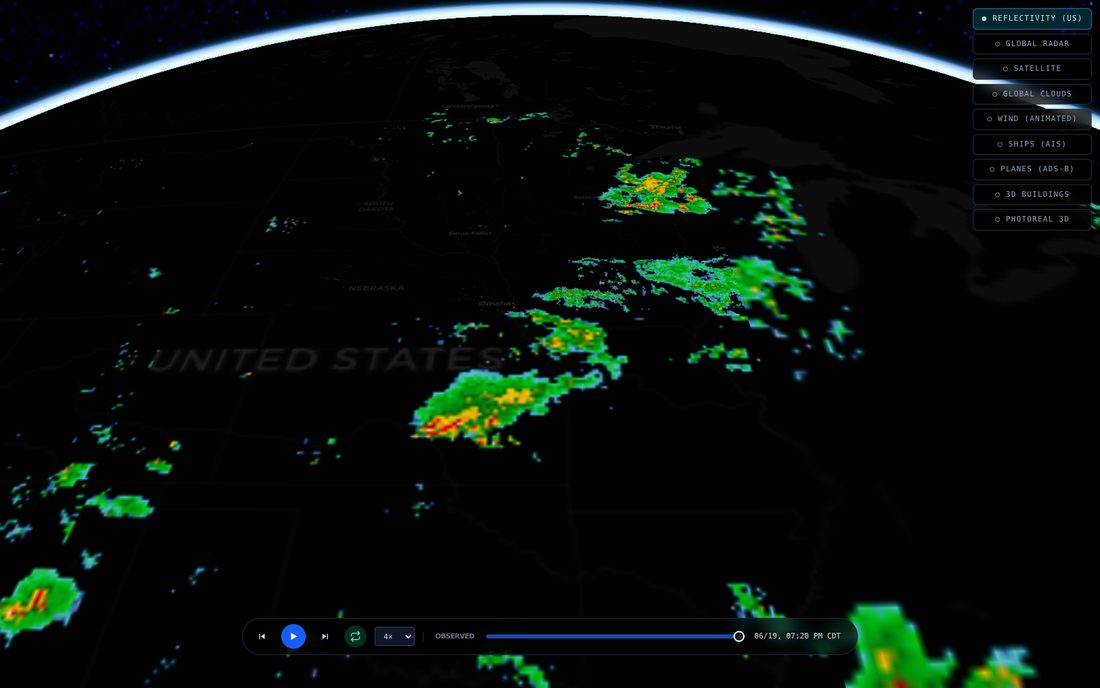
The base is a 3D globe rendered with Cesium, a dark map for land and coastlines so nothing competes with the weather, and a camera that starts looking down over the United States at an angle. Everything after that is a layer I drape on top, and every layer came with its own surprise.
Radar first, and the flicker
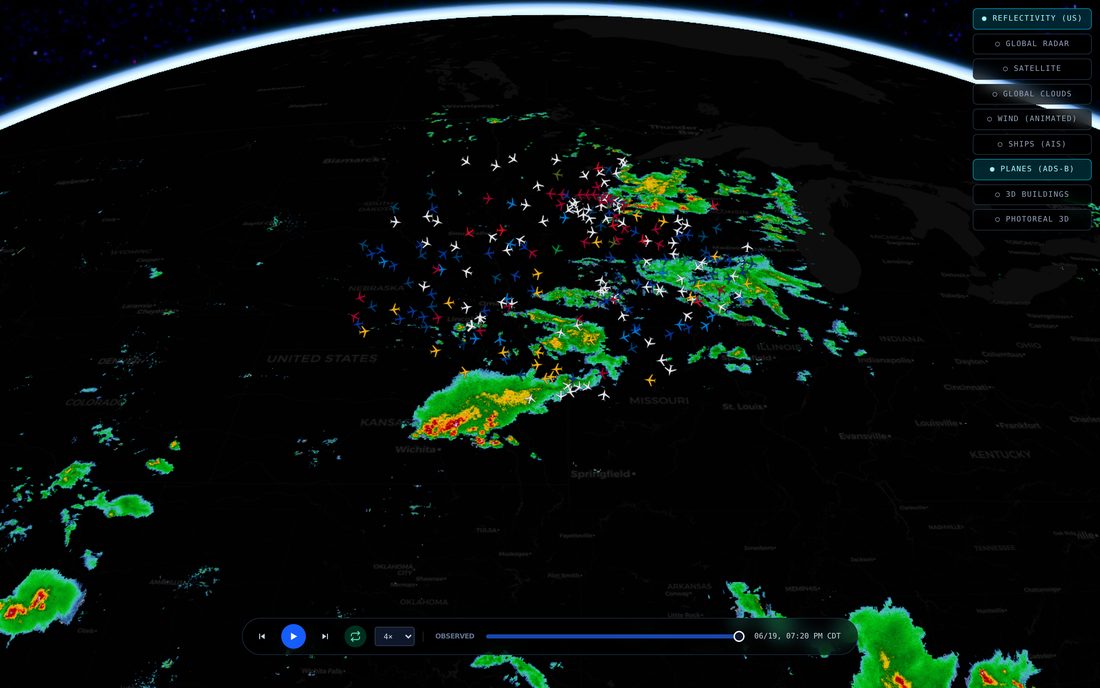
The radar is the whole point, so it loads by default. Over the US it is the national network of weather radars, the live reflectivity that tells you where rain and hail actually are right now, painted as a half-transparent sheet over the dark map. Outside the US a second worldwide composite fills in, so a storm over the Atlantic or Japan still shows up. A scrubber at the bottom lets you run the last hour or two as a loop.
That loop is where the first fight started. Cesium will not let you swap a map layer's image in place; to show the next frame you hand it a new layer, and the old one vanishes the instant you ask. So stepping through frames made the radar blink down to a bare map and back on every single step, a strobe nobody wanted to watch. The fix is to keep the frame you are leaving underneath the one you are loading, and only retire the old layer once the new tiles have actually finished drawing. Two layers stacked for a heartbeat during fast scrubbing, collapsing back to one clean layer the moment you pause.
The wind that would not move
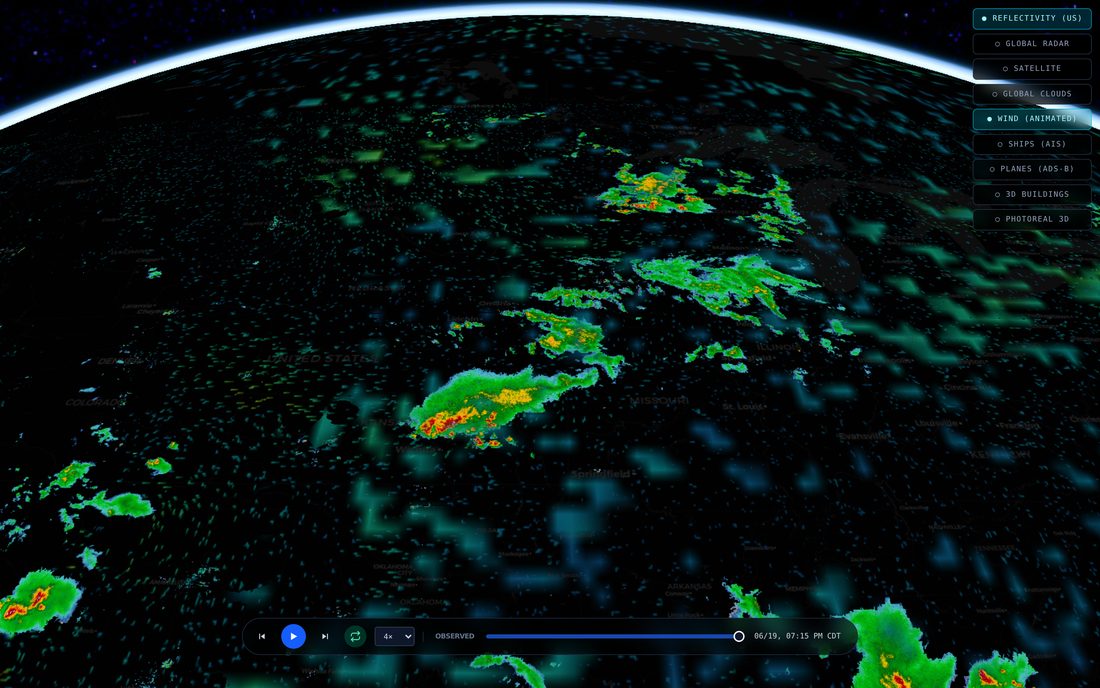
Wind is my favorite layer and the one that humbled me twice. It is tens of thousands of tiny particles being pushed along the real wind field, leaving glowing trails that fade behind them, a global flow from the coarse forecast model plus a finer, more turbulent flow over the US from the high-resolution one. The particles are advected on the graphics card on a hidden canvas, and that canvas gets draped onto the globe so Cesium can wrap it around the horizon for me.
The first time I turned it on, the wind was frozen. The simulation was running perfectly on its hidden canvas, I could log the particles moving, but the globe showed a still image. It turns out Cesium decides whether a draped texture has changed by checking whether the image is the same object as last time, and I was handing it the same canvas every frame, so it never bothered to re-upload. The fix is almost too silly to admit: I keep two identical canvases and alternate between them, so the reference flips every frame and Cesium is fooled into noticing.
The second bug looked like dead wind too, but for a different reason. The particles move through an abstract zero-to-one space, not real distance, so a fixed step size works at any zoom. An earlier version scaled that step by how wide the visible patch of map was, which meant the global flow, spread across the whole planet, crawled less than a single pixel per frame. No streaks, just a faint shimmer. The wind was not broken, it was moving too slowly to see, which is its own kind of broken.
Clouds from orbit, and a thing money can't buy
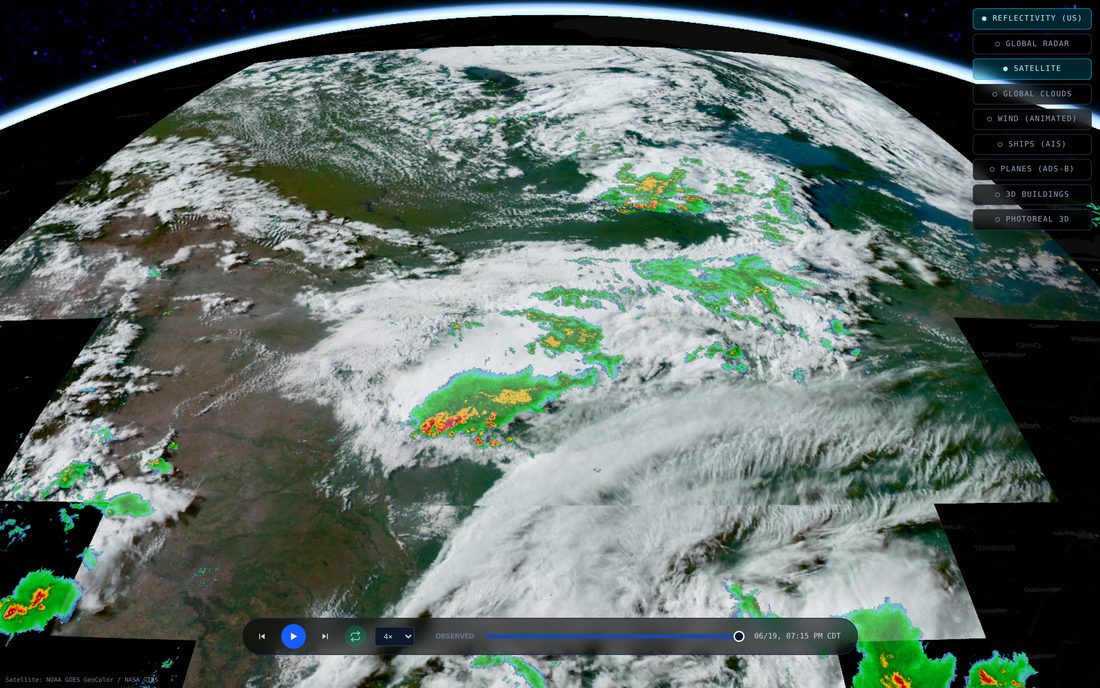
There are two cloud layers, and the reason there are two is a small lesson in what is actually available for free. The pretty one is true-color satellite, the view that looks like daylight Earth with real cloud shadows, blue water, green land. The catch is that the satellite making that image only watches one half of the planet, the Americas and the Atlantic, because that is where it sits in its orbit. Spin the globe to Asia and there is nothing there at all.
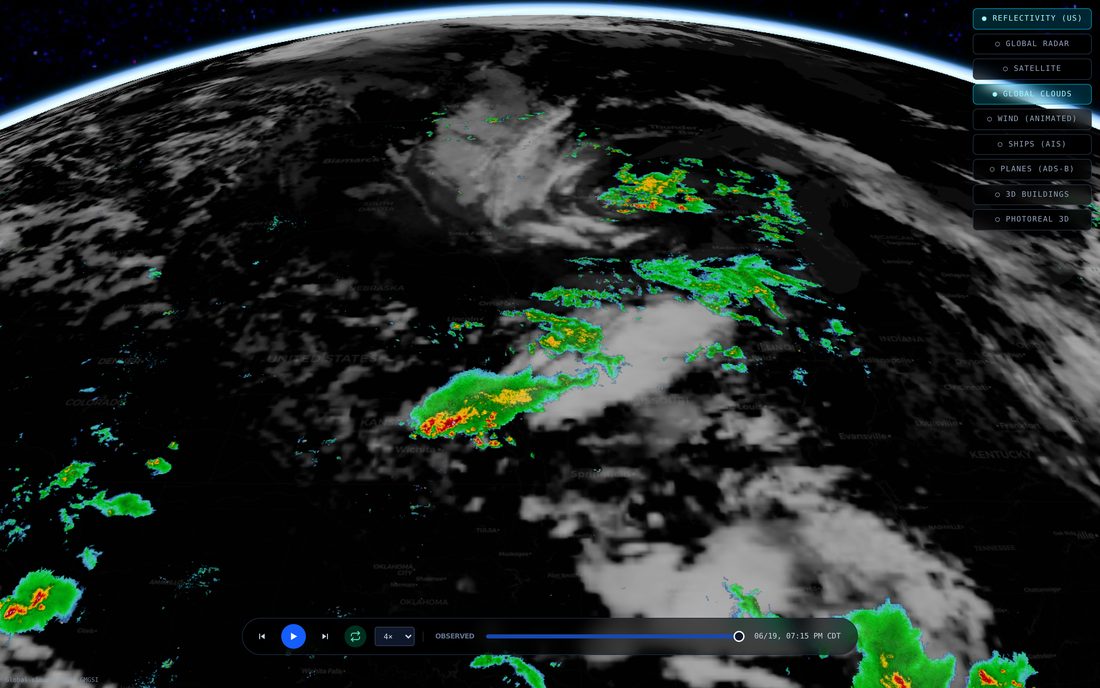
So a second layer exists to cover the whole world: a blended infrared mosaic from the weather satellites, stitched into one image of the entire globe, day and night. It is less photographic but it is everywhere, which the true-color one can never be. A truly global, true-color, day-and-night cloud layer is not a thing you can go buy. The honest move was to ship both and let you pick, rather than pretend one of them was the whole answer.
That infrared layer taught me two things the hard way. First, the image stops at about seventy-three degrees north and south, because a satellite parked over the equator physically cannot see the poles; drape it as if it reached the poles and the top and bottom rows smear into long vertical streaks. Second, in that data cold is bright. The coldest cloud tops carry the highest value, not the warmest, so when I first assumed the numbers were temperatures the clouds vanished and the clear desert turned into a solid white sheet.
Live planes
Switch on the aircraft layer and every plane currently in the sky near your view shows up as a little silhouette, turned to face the way it is flying, sitting at its real altitude. It pulls live transponder data, the same signal that feeds the flight-tracking sites, refreshed about every ten seconds around wherever the camera is pointed. Click one and the camera locks onto a 3D plane model trailing it, with a panel telling you the flight number, the aircraft type, who operates it, how fast and how high.
The bug here was pure geometry and very funny once I saw it. The plane model is built nose-pointing east, but a heading of zero in the real world means pointing north. So out of the box every aircraft flew sideways, a whole sky of planes crabbing along ninety degrees off their direction of travel, until I rotated the model to line its nose up with true north.
Live ships
The ships layer works the same way for the water. There is a feed of marine traffic, the position reports vessels broadcast over the radio, and the globe keeps a running picture of where everything is. Markers point the way each ship is heading, colored by how fast it is going. Click a vessel and the camera drops down to follow a 3D hull alongside it, with its name, type, length, draught and destination.
Two things tripped me up. The feed arrives as raw binary frames, not text, so the obvious approach of reading each message as JSON failed silently on every single one until I taught it to decode the bytes first. And following a ship turned out to need a hand-tuned camera, because a plain box-shaped marker has no real size for the camera to measure, so the auto-follow had no idea how far back to sit; I had to tell it explicitly to ride a few hundred meters astern and a bit above, or it would try to frame a vessel from orbit.
Real ground under the weather
The globe is not a smooth ball. There is real elevation under everything, so river valleys cut in and mountains stand up beneath the radar, decoded from free public terrain tiles on the fly in the browser. Getting those tiles to the page was a route-ordering puzzle that cost me an afternoon.
The app sends most of its data requests through one path that forwards them to our weather backend. Terrain could not go through that path: the forwarding rule runs before the page's own routes get a chance, so terrain tiles would have been shipped off to the weather server, which has never heard of them, and come back empty. They had to live at their own address instead. On top of that, the raw terrain tiles arrive without the permission header a browser needs to read an image's pixels, and reading the pixels is the whole point, since that is how the elevation is decoded. So they get fetched through a small same-origin pass-through that exists for no reason other than to make the browser willing to look at them.
The globe that only glows from far away
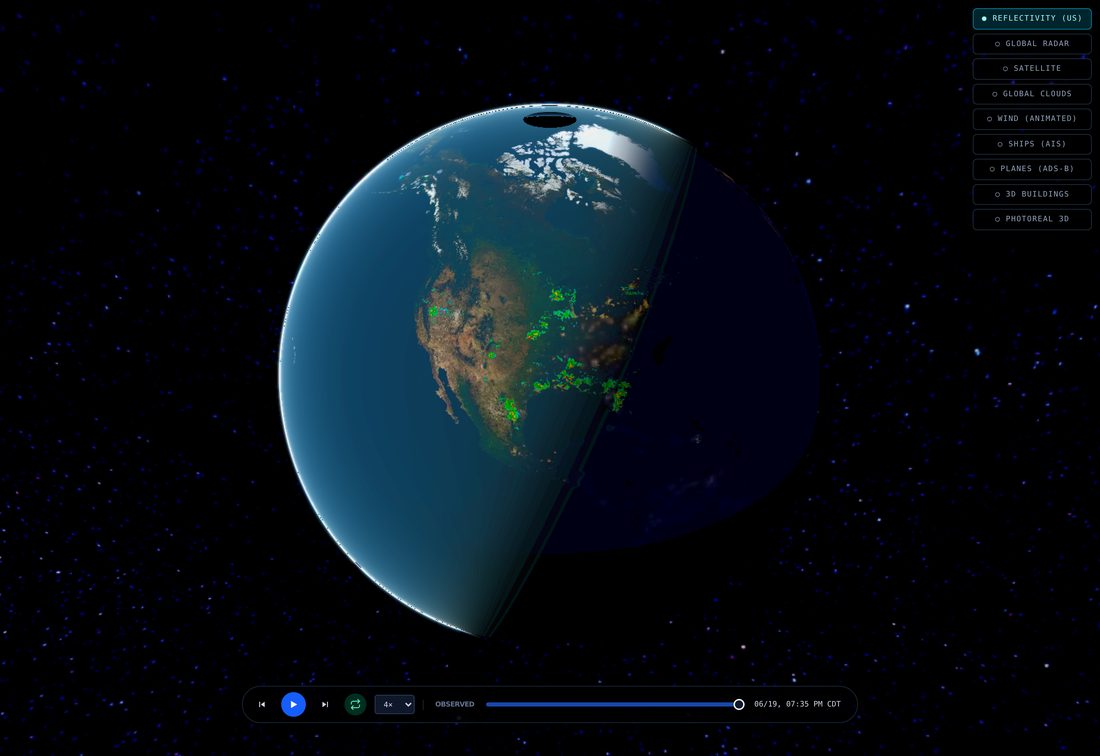
Pull the camera way back, out past a few thousand kilometers, and the globe changes character. The real sun lights it, so there is a proper day-and-night line sweeping across, the atmosphere glows blue at the edge, and on the dark half the cities light up. That is the hero shot, the living planet. It is also switched off most of the time on purpose.
Up close, all that beauty works against the actual job. Real sun lighting dims the radar on whatever half of the country is in night. The city lights, which are a fairly low-resolution image, smear into big yellow blobs when you are right on top of them. So every bit of that cinematic realism is tied to altitude: it only appears once you are far enough out for it to look good, and the moment you dive back toward a city the globe snaps to a flat, evenly lit tactical map where the radar reads clearly. A weather tool first, a pretty planet second, and never both in the same breath.
The expensive layers, kept on a leash
Two more layers exist that I keep firmly switched off by default, because they cost money or quota to draw. One swaps the whole map surface for Google's photoreal 3D city, the textured mesh you fly through in Google Earth, so you can drop from the radar view down to street level among real buildings. The other adds 3D building shapes from the open map data. Both are metered, so they wait behind a tap rather than loading for every visitor and every passing bot.
The photoreal layer carries one quirk worth knowing: because it replaces the ground entirely, it cannot coexist with the draped radar surface without the two fighting over the same pixels and shimmering. So turning it on quietly hides the globe's own surface, and turning it off brings it back. You get the real city or the weather sheet, not a war between them.
Under the hood
For the parts list: the globe itself is Cesium, the open-source 3D mapping engine. The dark basemap and the road geometry come from the usual open map sources. US radar runs through our own weather backend; the worldwide radar composite, the satellite clouds, the wind fields, the night lights and the elevation all come from public weather and mapping feeds, the kind that governments and open-data projects publish for anyone to use. The marine and aircraft positions come from open tracking feeds. The photoreal city and the building shapes are the only metered pieces.
The one piece of plumbing that ate the most time was the browser's security policy. Cesium compiles little programs at runtime to draw and to evaluate map styles, so the page has to grant it permission to do that, and a stricter setting that I tried first refused to let it run at all; I only found out by reading the browser's own complaint in its violation report. And because Cesium fetches every map tile as a data request rather than as a plain image, every single source of tiles had to be named in the permission list as somewhere the page is allowed to talk to, not just somewhere it is allowed to show pictures from. Miss one and that layer just silently never appears.
Where it's going
The globe already carries more live layers than I set out to add, which is the nice problem to have. The work from here is the unglamorous kind: a denser ship picture when the feed is generous, a smoother jump from the orbital view down into a single city, and tighter timing so the radar loop and the wind stay locked to the same minute. The thing started life as a throwaway and refuses to die, so I have stopped fighting it and just keep adding sky.